


Bible Homescreen - Read Now
4.6573.00 Reviews
App Specs
- Version
- 1.5.12
- Updated On
- License
- Free
- Downloads
- 100,000+
- Developer
- Homescreen Apps
- Categories
- Books & Reference
- Platform
- Android
Screenshots
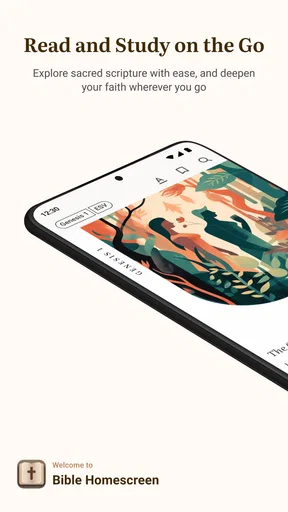
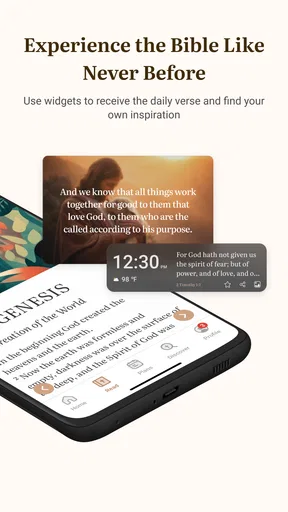
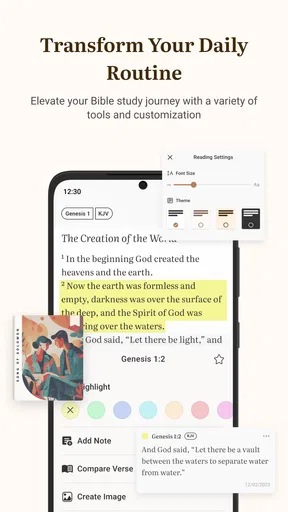
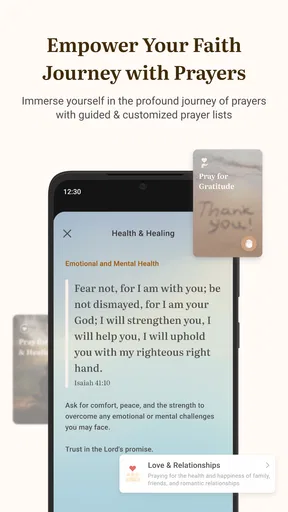
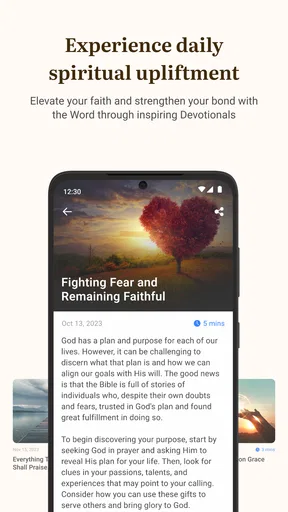
 Analysis by AppCompare
I rarely keep a reading app on my home screen unless it gives me a good reason to return to it. Bible Homescreen - Read Now takes a direct approach: it places Bible reading closer to the first thing I see when I use my phone. That sounds simple, but the simplicity is the point. Instead of waiting until I remember to open a Bible app, I can use the home screen as a gentle prompt to pause, read, and reflect.
After spending time with it, I see this as a focused Books & Reference app rather than a full replacement for every Bible tool. It is aimed at people who want Scripture to become part of an everyday phone routine, especially during quiet moments in the morning, a commute, or a short break. Its strongest idea is turning intention into a visible habit. Whether that works for you depends on how comfortable you are with giving a faith-based app a prominent place in your daily phone experience.
How Bible Homescreen feels in its current form
Bible Homescreen - Read Now is developed by Homescreen Apps and is available as a free app for Android users. It carries an Everyone 10+ content rating, so it is positioned for a broad audience while still acknowledging that religious reading can involve themes that are better suited to older children and adults. The app has reached over one hundred thousand installs and holds a 4.6 average from around four thousand ratings, which suggests that its central idea has connected with a meaningful group of users.
The first thing I noticed is that this is not trying to overwhelm me with a huge collection of study tools. The experience is built around access and visibility. The store short description calls it “Bible Homescreen,” and that accurately describes the product’s identity: it is less about creating a complicated research workspace and more about making Bible reading easier to begin.
That distinction matters. A traditional Bible app usually asks me to open it, choose a translation, browse books, search for a passage, or continue a reading plan. Those options can be valuable, but they also create small decisions before reading starts. This app’s home-screen concept reduces that distance. When the reading prompt is already part of the phone environment, the action feels less like a scheduled task and more like a natural interruption in the day.
I would recommend it first to someone who already wants to read the Bible but struggles with consistency. It can also suit a person who prefers short, repeated contact with Scripture instead of sitting down for a long study session. On the other hand, readers who need extensive commentary, original-language tools, audio material, or detailed cross-referencing may find the experience too narrow compared with a conventional Bible study app.
The practical value of a home-screen reading habit
The most useful way to think about this app is as a habit aid. Imagine checking your phone before work and seeing a Bible-related reading opportunity instead of immediately opening social media. You may only have a few minutes, but that can be enough to read a passage and carry one idea into the rest of the morning. Later, during a waiting period or lunch break, the same setup can make a second short reading feel effortless.
Worth Reading Before You Choose

EA SPORTS FC Mobile 26 Is a Bigger Football Game, but It Takes Time

Flipboard Shows What News Apps Must Do Beyond the Feed

Switching to Android Auto Means Rethinking Your Driving Routine

Google Calendar Makes a Crowded Week Easier to Manage

Ludo King Makes the Most of the Minutes Between Plans

Baby Panda World Brings Quick Play to Modern Phones, but Its Game Library Feels Busy
This workflow is different from setting a reminder. A notification can be dismissed and forgotten; a home-screen presence remains part of the visual landscape. That can be helpful for users who respond better to environmental cues than alarms. It also means the app works best when the user deliberately places it where it will be noticed without becoming visual noise.
There is a trade-off here. A persistent faith-focused element may be encouraging for one person and distracting for another. If you prefer a minimal home screen or frequently change your layout, the central concept may feel like an intrusion rather than support. I would not install it simply because I like Bible apps in general. I would install it if I specifically want my phone’s opening moments to encourage Bible reading.
One practical tip is to connect the app with a specific part of your day instead of expecting it to create a habit by itself. For example, I would use the first home-screen check after waking as the reading cue, then leave the phone alone until I have finished the passage. This avoids turning the app into another icon that I swipe past automatically. The value comes from the routine built around it, not just from installation.
What the current version tells me about its direction
The current version is 1.5.12, and the app was released on October 4, 2023. Those details place it in a relatively young stage of its product life, but the version number also indicates that it has moved beyond an initial launch build. I see that as a sign of an app being refined around its main purpose rather than presented as a one-off experiment.
Still, a version number alone does not tell me that the app has become a complete Bible platform. The important question is whether future development keeps improving the home-screen experience without burying it under unrelated features. For this product, evolution should be judged by how smoothly it helps users read, return, and maintain a calm routine.
For someone considering installation today, the current state is easier to understand when separated from expectations. The confirmed experience is the Bible-centered home-screen concept and its role as a reading prompt. Anything beyond that should be evaluated through actual use rather than assumed from the app’s relatively mature version number. I appreciate that restraint because a focused app can lose its identity when it tries to imitate every larger alternative.
The developer, Homescreen Apps, has chosen a very recognizable niche. That gives the product a clearer personality than a general-purpose Bible reader, but it also raises the standard for polish. If the home-screen element is reliable and easy to live with, the narrow focus becomes a strength. If it feels awkward to configure or easy to ignore, there are plenty of conventional Bible apps that provide a more familiar reading path.
How existing users may experience the update path
For an existing user, moving to the current version should be viewed less as learning an entirely new Bible system and more as continuing with an established reading routine. The likely benefit of staying current is access to the developer’s ongoing refinements, while the core reason to use the app remains unchanged: keeping Bible reading close at hand.
I would approach an update by checking whether the home-screen arrangement still fits my phone layout and whether my reading routine feels as immediate as before. This is especially important for people who have built a morning or evening habit around the app. A small change in placement or presentation can affect whether the prompt feels natural, even when the underlying purpose remains the same.
There is also a useful distinction between existing users who want continuity and new users who want depth. Existing users may value the app precisely because it has become part of their environment. New users may compare it with larger Bible products and wonder why they should choose a narrower tool. My answer is that continuity and visibility are the product’s real advantages; a broader feature list is not necessarily the point.
If I were helping a friend decide whether to keep it installed, I would ask what happens after the prompt appears. Does it lead to actual reading, or does the friend dismiss it automatically? If it leads to reading even briefly, the app is doing something worthwhile. If the home-screen presence has become invisible, changing the phone layout or pairing the app with a fixed reading time may help more than searching for additional settings.
Another practical consideration is cost. The app is free to download, but it includes in-app purchases ranging from $1.99 to $12.99 per item. That means a user can begin without paying, while some optional elements may require spending later. I would recommend exploring the free experience first and deciding whether any paid item supports a genuine need rather than buying simply because the app has become part of a routine.
Where it differs from ordinary Bible apps
Most Bible apps compete through breadth: multiple translations, search, bookmarks, plans, notes, audio, devotionals, or study references. Bible Homescreen - Read Now competes through placement. That is a meaningful difference because it addresses the moment before reading, not only the reading interface itself.
In a standard app, I usually need to make a conscious choice to begin. That is ideal when I am studying a particular passage or comparing translations. In this app, the home screen can act as the first invitation. The advantage is lower friction; the disadvantage is less control if I want to choose a detailed study path immediately.
I would use a conventional Bible app when preparing a lesson, researching a theme, or following a structured plan with extensive notes. I would choose this one when my main problem is remembering to open Scripture at all. The two approaches can coexist, but they serve different jobs. Trying to make Bible Homescreen function like a complete study suite would miss why its design is appealing.
That also explains who should skip it. If you dislike home-screen widgets or persistent visual prompts, the app may work against your preferences. If you need offline study, a specific translation, audio narration, or advanced search, you should verify those needs directly before making it your primary Bible tool. The app’s name and concept tell me where its priority lies, but they do not make it a universal answer for every reading style.
Remaining gaps and small points of friction
The focused design creates some limitations. A home-screen reading prompt can encourage consistency, but it cannot replace personal motivation. On difficult days, I may still dismiss it. The app can reduce the number of steps between seeing the reminder and reading, yet it cannot guarantee attention or reflection.
There is also a risk of repetition in the broader habit. If the experience does not offer enough flexibility for different moods or reading goals, a user may eventually want a more deliberate way to choose passages. That is where a traditional Bible app can feel stronger. It gives me a library and a set of tools; this app gives me a nudge and a convenient doorway.
Another gap is the need to balance spiritual focus with phone fatigue. Many people already see too many prompts during the day. Adding another visible element is beneficial only if it feels peaceful and relevant. I suggest placing it somewhere intentional rather than in the most crowded area of the home screen. That makes the app easier to notice when I want it and less likely to become background clutter.
The purchase model may also make some users pause. Starting free is helpful, but the presence of optional purchases means I would pay attention to which parts are included before committing to the app as a long-term routine. A clear personal rule works well here: use the free experience long enough to see whether it changes your reading behavior, then consider a purchase only if it adds practical value.
Finally, Android compatibility matters. The minimum operating-system requirement is Android 9, so users on older phones should check compatibility before planning around the app. For people with supported devices, that requirement is unlikely to be an issue, but it is still worth considering when recommending the app to someone using an older handset.
What I would watch as the app continues to develop
The most important future question is whether updates strengthen the central habit without making the experience busier. I would watch for improvements that make reading prompts more useful, placement more flexible, and transitions into Scripture more immediate. Those changes would directly serve the app’s identity.
I would be less interested in feature growth for its own sake. Adding every tool found in large Bible platforms could make the app harder to understand and weaken the calm, focused reason to use it. The best evolution would preserve the quick home-screen entry while giving regular users enough variety to avoid feeling locked into a single routine.
For new users, I would also watch how well the app explains its role during the first session. A person who expects a full study library may be disappointed if the app is not framed clearly. A person who wants a simple Bible reminder may appreciate a quick, uncluttered start. Good product direction here means setting the right expectation from the beginning.
My own test would be simple: after a week, am I reading more often because the app is present? That is a better measure than counting how many times I opened it. If the answer is yes, the app has earned its place. If the answer is no, a larger Bible app with a reading plan or a conventional reminder may be a better match.
Overall, I see Bible Homescreen - Read Now as a thoughtful, specialized choice for people who want Bible reading woven into the visual rhythm of their phone. It is free to start, has a clear purpose, and comes from Homescreen Apps with a current version that shows continued development since its release. Its limitations are real, especially for deep study and users who dislike home-screen additions, but they are closely tied to the same focused design that makes it appealing.
I would recommend it to a friend who says, “I want to read the Bible more often, but I keep forgetting.” I would not recommend it as the only Bible resource for someone researching passages in depth. Used for what it is—a visible, low-friction invitation to read—it can turn a vague intention into a repeatable everyday moment. If your main obstacle is getting started, this app is worth trying before you decide you need something more complicated.
Pros
- Quick access to Bible verses directly from the home screen
- Clean
- peaceful design that suits daily devotional use
- Helpful for building a consistent Scripture-reading routine
- Lightweight experience with minimal distractions
- Convenient for users who prefer short
- frequent readings
Cons
- Limited appeal if you want advanced Bible study tools
- Home-screen features may depend on launcher permissions
- Verse selection may feel repetitive over time
- Customization options can be less extensive than expected
- Requires comfort with displaying religious content publicly
FAQs for Bible Homescreen - Read Now
What is Bible Homescreen - Read Now?
Bible Homescreen - Read Now is an Android app designed to keep Bible content accessible from your device’s home screen. Depending on the available setup, it may provide scripture passages, inspirational verses, or Bible-related reminders without requiring you to open a full reading app first. It is intended for users who want brief, regular contact with biblical text throughout the day.
How does Bible Homescreen - Read Now work?
After installing the app, you generally need to add and configure its home-screen widget or related shortcut. The displayed content can then appear directly on your phone’s home screen, making it easy to read a verse while checking notifications or unlocking the device. Settings may allow you to adjust the widget’s appearance, refresh behavior, or the type of Bible content shown.
Does Bible Homescreen - Read Now require an internet connection?
Internet requirements can depend on how the app delivers its Bible content and whether the selected passages are cached on your device. Basic previously loaded text may remain available offline, while refreshing daily content, downloading additional material, or loading external links may require Wi-Fi or mobile data. Check the app’s permissions and settings before relying on it without connectivity.
Is Bible Homescreen - Read Now free to download and use?
The app may be available to download at no initial cost, but availability of premium features, advertising, donations, or optional purchases can vary by platform and version. Before installing, review the official store listing for current pricing and in-app purchase information. Also check whether the free version includes the widget, full verse text, customization options, and all available content.
Is Bible Homescreen - Read Now suitable for daily Bible reading?
The app can be useful for short devotional moments, reminders, and discovering individual verses directly from the home screen. However, a homescreen widget is usually more focused on quick access than structured study. Users seeking reading plans, multiple translations, detailed commentary, bookmarking, audio, or extensive search tools may prefer to use it alongside a full-featured Bible application.


